Production Reference

Graphic Guidelines

Production-ready file specifications, resolution requirements, and timelines for Greenspace Group fabrication projects.

Recommended File Basics

Fabric Substrate

All graphics produced on a fabric substrate MUST be prepared with a 2" bleed around the perimeter of the graphic.

Hard Surface / Vinyl

All graphics produced for any hard surface substrate or adhesive vinyl MUST be prepared with a ½" bleed around the perimeter.

Outlined Text

All text must be outlined (Type Menu → Create Outlines). Text for cut vinyl must be larger than ⅜"h.

Production-Ready

Files submitted are assumed production-ready. Alterations requested by the client will incur an hourly charge.

Proofreading

Greenspace presumes all submitted text has no typos and is grammatically correct.

Rich Black

Set blacks as Rich Black: 60/60/40/100 for all applications.

60%Cyan
60%Magenta
40%Yellow
100%Black
Rich Black #231F20

Acceptable File Formats

Vector Preferred: Vector artwork (AI, EPS, SVG) is strongly preferred for all graphics. Vector files scale infinitely without quality loss and produce the sharpest results at any size. Raster images are accepted where photography or complex textures are required.
Adobe Illustrator
  • All placed images should be provided as linked images. No embedded files.
  • All text must be outlined (Type Menu → Create Outlines).
  • If PANTONE color matching is required, specify the colors in the artwork.
  • File color mode must be set to CMYK.
  • Assign GRACoL 2013 or SWOP v2 ICC profile.
  • Set blacks as Rich Black: 60/60/40/100.
Adobe InDesign
  • All placed images should be provided as linked images. No embedded files.
  • All text must be outlined (Type Menu → Create Outlines).
  • If PANTONE color matching is required, specify the colors in the artwork.
  • File color mode must be set to CMYK.
  • Assign GRACoL 2013 or SWOP v2 ICC profile.
  • Set blacks as Rich Black: 60/60/40/100.
Adobe Photoshop
  • File color mode must be set to CMYK and only an 8-bit color channel submitted.
  • Assign GRACoL 2013 ICC profile.
  • Be sure to flatten all layers.
  • Set blacks as Rich Black: 60/60/40/100.
TIFF Files

TIFF files are accepted. Refer to the general file basics above for bleed and resolution requirements.
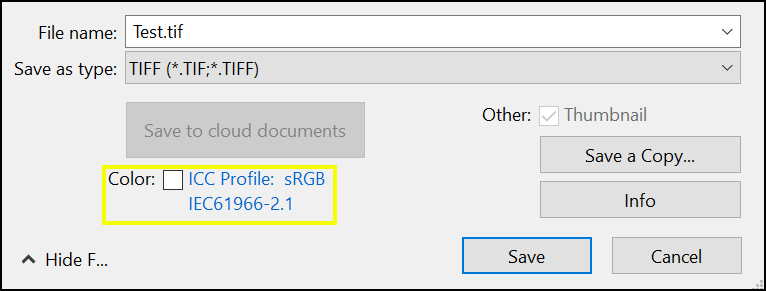
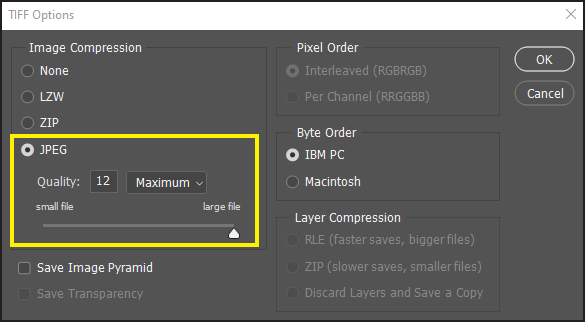
TIFF Save Settings TIFF Options
Raster PDF Files
  • Please convert all text to outlines before generating the PDF.
  • Export as PDF/X-4 (ISO 15930-7). This is the current industry standard for print-ready PDF.
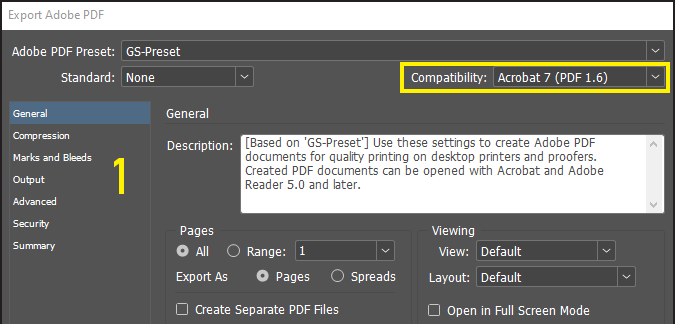
  • Compatibility: Acrobat 8 (PDF 1.7) or later.
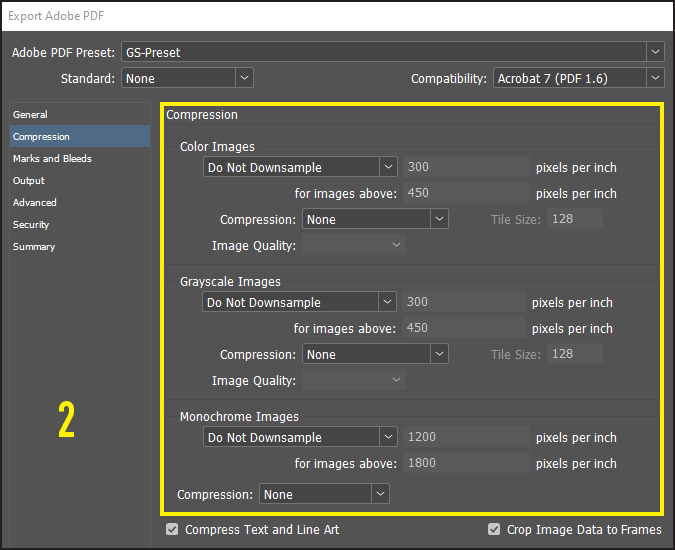
  • Compression: Color images set to Do Not Downsample, compression set to None.
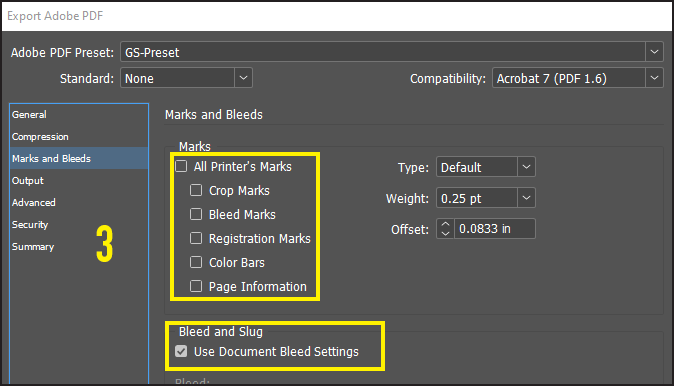
  • Marks and Bleeds: No check boxes, except Use Document Bleed Settings.
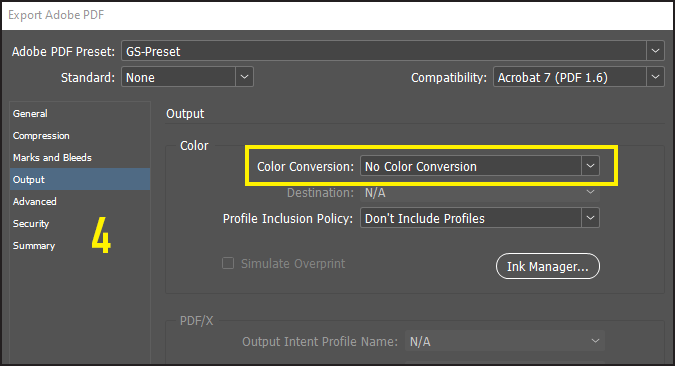
  • Output: No Color Conversion.
PDF Settings 1 PDF Settings 2 PDF Settings 3 PDF Settings 4
⚠ Important: Files submitted that do not meet the above criteria may be charged an hourly rate to modify.

Recommended File Resolutions

Resolution requirements are based on viewing distance, not just physical dimensions. For large format graphics, working at a reduced scale (½, ¼, or ⅒) with proportionally higher resolution is standard practice.

Viewing DistanceMinimum ResolutionTypical Application
Close (under 3 ft)300 ppi at final sizeTabletop displays, retail signage, product graphics
Mid-range (3–8 ft)150–200 ppi at final sizeInline booth graphics, banners, hanging signs
Far (8–20 ft)100–150 ppi at final sizeIsland exhibit backwalls, overhead signage
Distant (20 ft+)50–75 ppi at final sizeBillboards, building wraps, venue-scale graphics
Working at Scale: For graphics exceeding 60" in any dimension, build your file at ½ or ¼ scale at double or quadruple the listed resolution. For example, a 120" graphic at 150 ppi can be built at ¼ scale (30") at 600 ppi.

Basic Production Timelines

Fabric Graphics

Minimum 3 weeks production required.

Applied Graphics

Minimum 1 week production required.
*May require more time if total square footage exceeds 500 sq ft.

Print Proofs

Requests for print proofs require a minimum of 3 weeks.

Rush Charges

All graphics with production-ready art files received fewer than 3 weeks before the ship date are subject to rush charges. Rush fees vary based on turnaround time and project scope. Contact your project manager for a quote before submitting rush files.

Need a File Upload Link?

If you require a file upload link or have further questions, contact:

chrism@greenspacegroup.net

Also see: True Black in CMYK (external reference) ↗